Why are patient names hidden in email reports?
Last updated: February 10, 2026
When you receive automated reports or analytics digests via email, you may notice that patient names are partially masked (e.g., St** Ja**).
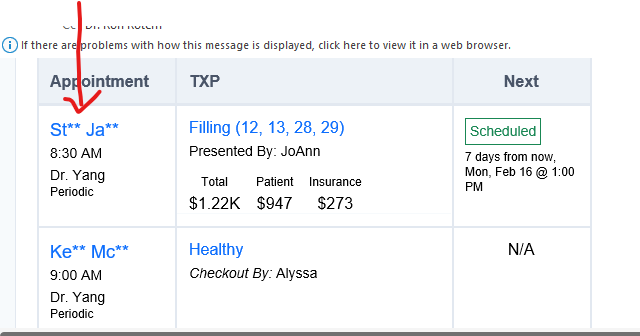
This is a privacy feature designed to protect sensitive patient information and ensure your practice remains compliant with HIPAA regulations.
Why we do this
Standard email is generally considered an insecure communication channel. If a patient's full name is paired with specific dental treatments or financial data in an unencrypted email, it constitutes a potential data breach.
To keep your data safe, our system:
Redacts Identifiers: We only display the first two letters of the first and last name.
Focuses on Analytics: These emails are intended to give you a high-level overview of stats, trends, and numbers at a glance.
Secures PHI: Protected Health Information (PHI) is kept strictly within our secure, encrypted platform.
How to view full patient details
If you need to see the full name or specific details of a patient mentioned in a report, you can easily "drill down" into the data:
Click the Link: Most reports include a blue hyperlink on the masked name or the treatment description.
Secure Login: Clicking the link will prompt you to log in to our secure platform.
View Details: Once authenticated, you will be taken directly to the detailed view where the full patient name and record are visible.
Note: We cannot "unmask" names within the email body itself, as this would compromise the security protocols protecting your practice.