Understanding Leaderboards
Last updated: October 20, 2025
TeamCare’s Leaderboards are designed to promote accountability, transparency, and healthy competition across your team. They provide real-time visibility into performance metrics tailored to each role, helping you identify top performers, support coaching opportunities, and track progress toward goals.
Overview
Each leaderboard is customized by role and updated daily with key metrics that reflect your team’s productivity and performance. These insights help you:
Celebrate top performers
Identify training or workload imbalances
Reinforce accountability and growth
Support data-driven incentive programs
Accessing Your Leaderboards
To view your leaderboards:
In the left-hand menu, click the trophy icon labeled Leaderboards.
A drop down will open with a list of available leaderboard categories.
Choose the leaderboard you want to view:
Doctor
Hygiene
Front Desk
Reactivation
Use filters at the top to adjust the date range or location (if applicable).
Click on a team member’s name to see more detailed performance data.
Tip: Make reviewing leaderboards part of your regular team check-ins to encourage progress, recognize achievements, and reinforce goals.
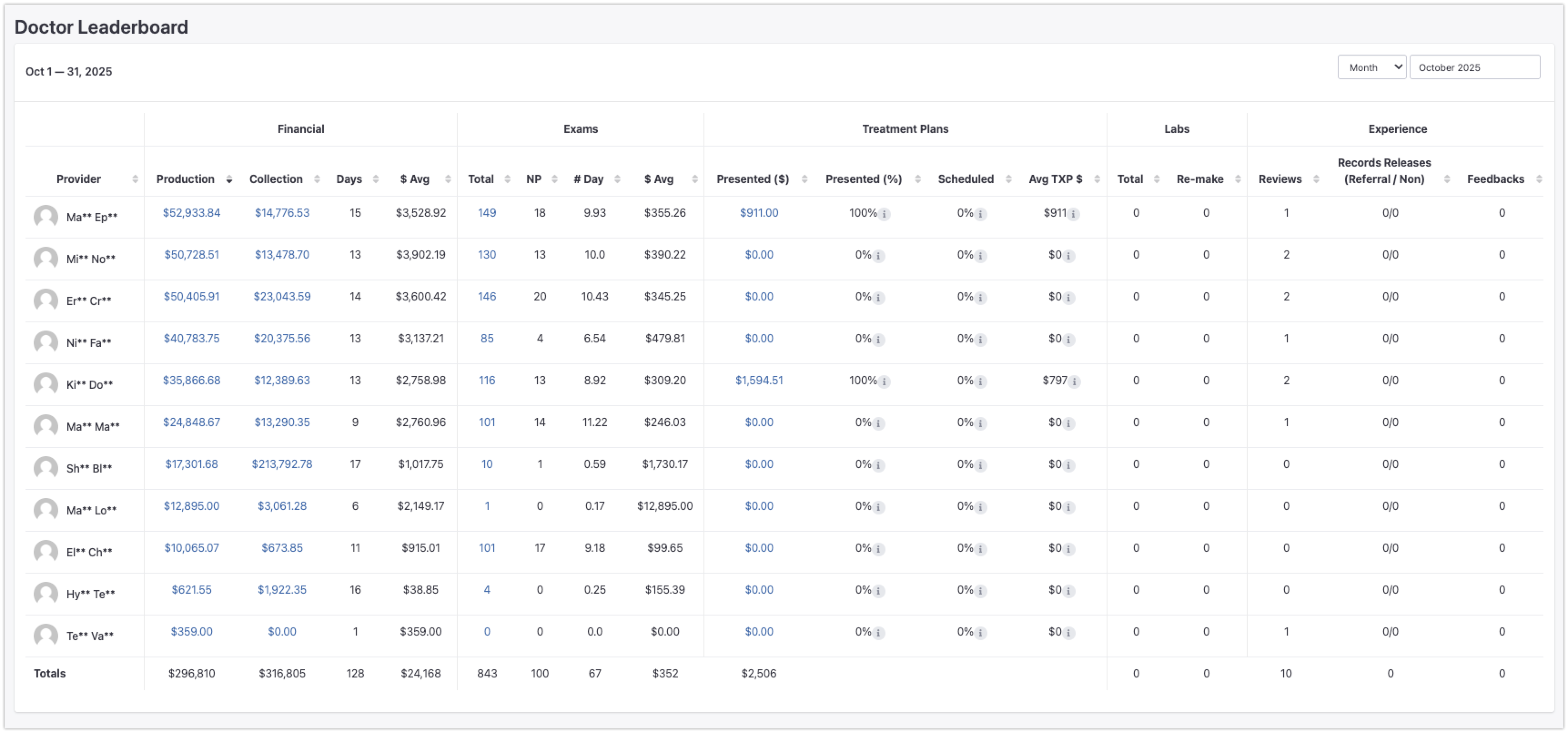
Doctor Leaderboard
The Doctor Leaderboard tracks performance metrics that reflect productivity, efficiency, and conversion of opportunities into production.
Metrics Tracked:
Number of Exams: Total exams completed by each doctor.
Production per Exam: Average production value per exam (benchmark: $400+).
Hygiene Leaderboard
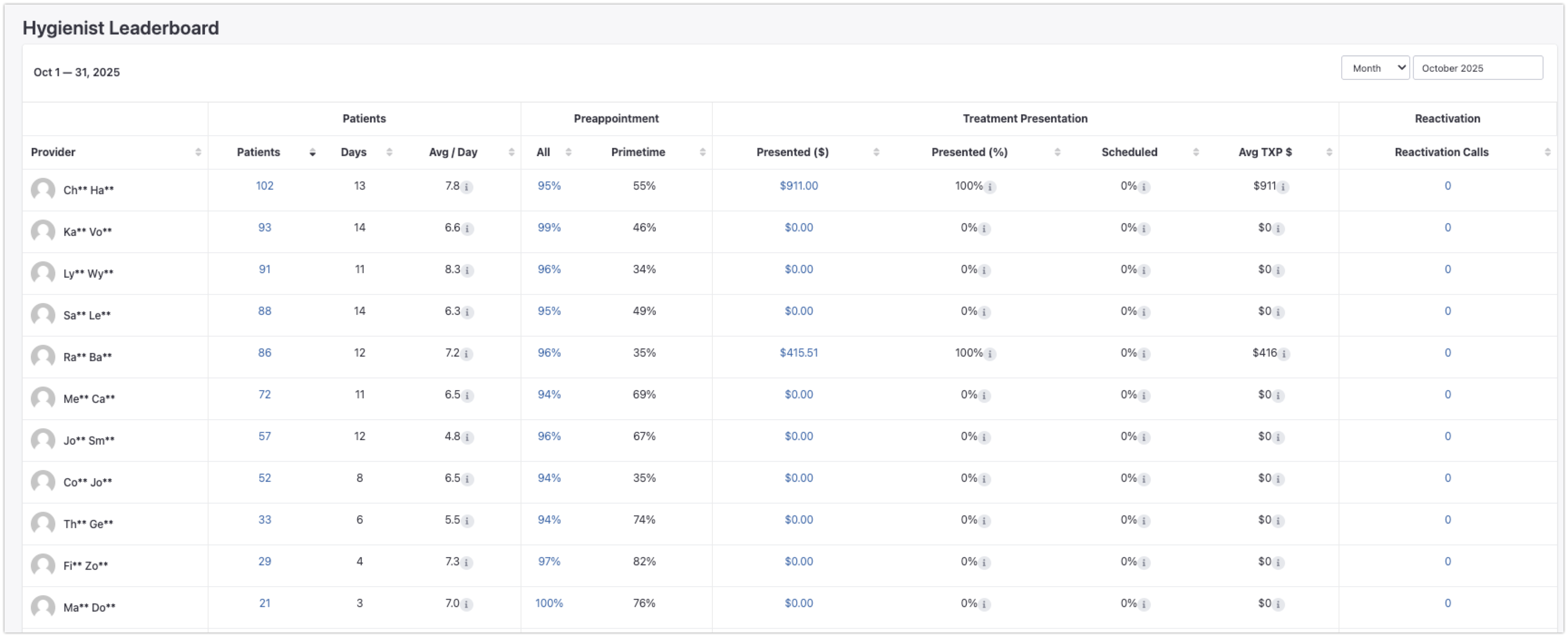
The Hygiene Leaderboard measures the productivity and retention effectiveness of your hygiene team.
Metrics Tracked:
Patient Volume: Number of hygiene patients seen per day or month.
Pre-Appointment Rate: Percentage of patients rebooked before leaving.
Front Desk Leaderboard
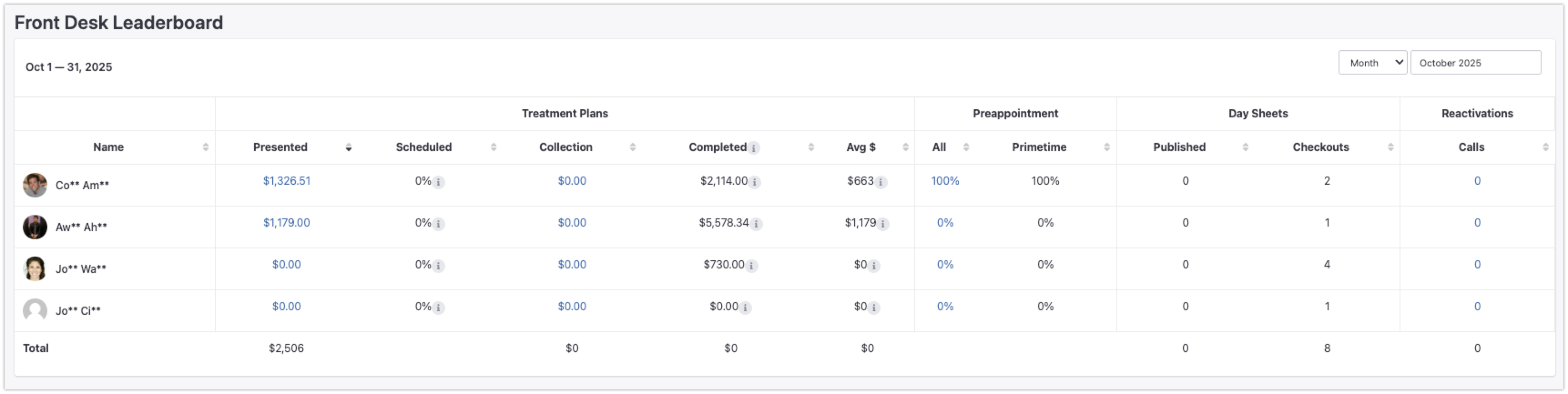
The Front Desk Leaderboard provides insight into administrative productivity and how effectively your front desk team supports scheduling, treatment presentation, and patient retention.
Metrics Tracked:
Treatment Plan Presentation: Total value of treatment plans presented.
Pre-Appointment Booking %: Percentage of patients leaving with a future appointment.
Day Sheets Published & Checkouts Completed: Measures admin workflow efficiency.
Reactivation Calls Made: Outreach efforts to inactive patients.
Primetime Bookings: Appointments made outside of typical 9–5, M–F hours.
Reactivation Leaderboard
The Reactivation Leaderboard is one of TeamCare’s most impactful tools. It tracks efforts to re-engage inactive patients, which is essential for sustainable practice growth.
Metrics Tracked:
Calls made
Voicemails left
Appointments scheduled
Denials and deactivations
Attendance from reactivation efforts

Best Practices for Using Leaderboards
Review Weekly: Incorporate leaderboard discussions into team check-ins.
Celebrate Wins: Recognize top performers publicly to reinforce motivation.
Identify Trends: Use data to spot workflow gaps or training opportunities.
Align with Priorities: Rotate focus between leaderboards based on current goals (e.g., hygiene volume, reactivation).
Reward Success: Use performance data for staff recognition and incentive planning.