Understanding Call Credit & Attribution in Reactivation
Last updated: February 14, 2026
Credit Attribution & Call Tagging in Hygiene Pro
Overview
This article clarifies how the Reactivation module attributes credit for patient scheduling. Users often express concern that selecting the wrong "Call Status" (e.g., tagging a call as Voicemail instead of Scheduled) will prevent them from receiving credit for a booked appointment. This is actually wrong and you don't need to worry. The below article will explain why:
How Attribution Works
Attribution towards success metrics does not rely solely on the manual tag selected by the agent at the time of the call. Instead, it uses a "Tail" Attribution Logic:
Initial Contact: The agent logs the call (even if tagged as "Voicemail" or "No Answer").
System Monitoring: The module continuously monitors the patient’s record in your PMS.
Automatic Updates: When that patient subsequently schedules or completes an appointment within the attribution window, the system automatically recognizes the link between the agent's outreach and the patient's activity.
Credit Assignment: Credit is assigned based on the patient's actual behavior (scheduling/attending), regardless of whether the initial call status was manually set to "Scheduled."
Common Scenario: "I accidentally tagged it as VM"
If an agent accidentally tags a call as Voicemail but the patient actually schedules an appointment during that call (or shortly after):
Do you need to revert the status? No.
Will the agent get credit? Yes. The system prioritizes the actual PMS data (the "Scheduled" or "Completed" status) over the manual call status tag.
Summary Table
If Agent Tags Call As... | And Patient Later... | System Result |
Voicemail | Schedules in PMS | Credit assigned to agent. |
No Answer | Completes Appointment | Credit assigned to agent. |
Scheduled | No-Shows | No credit (system tracks completion). |
Note: Manual tagging is primarily for internal office notes and tracking outreach attempts. It does not "break" the automated sync between PMS and TeamCare.
Understanding the Reactivation Leaderboard
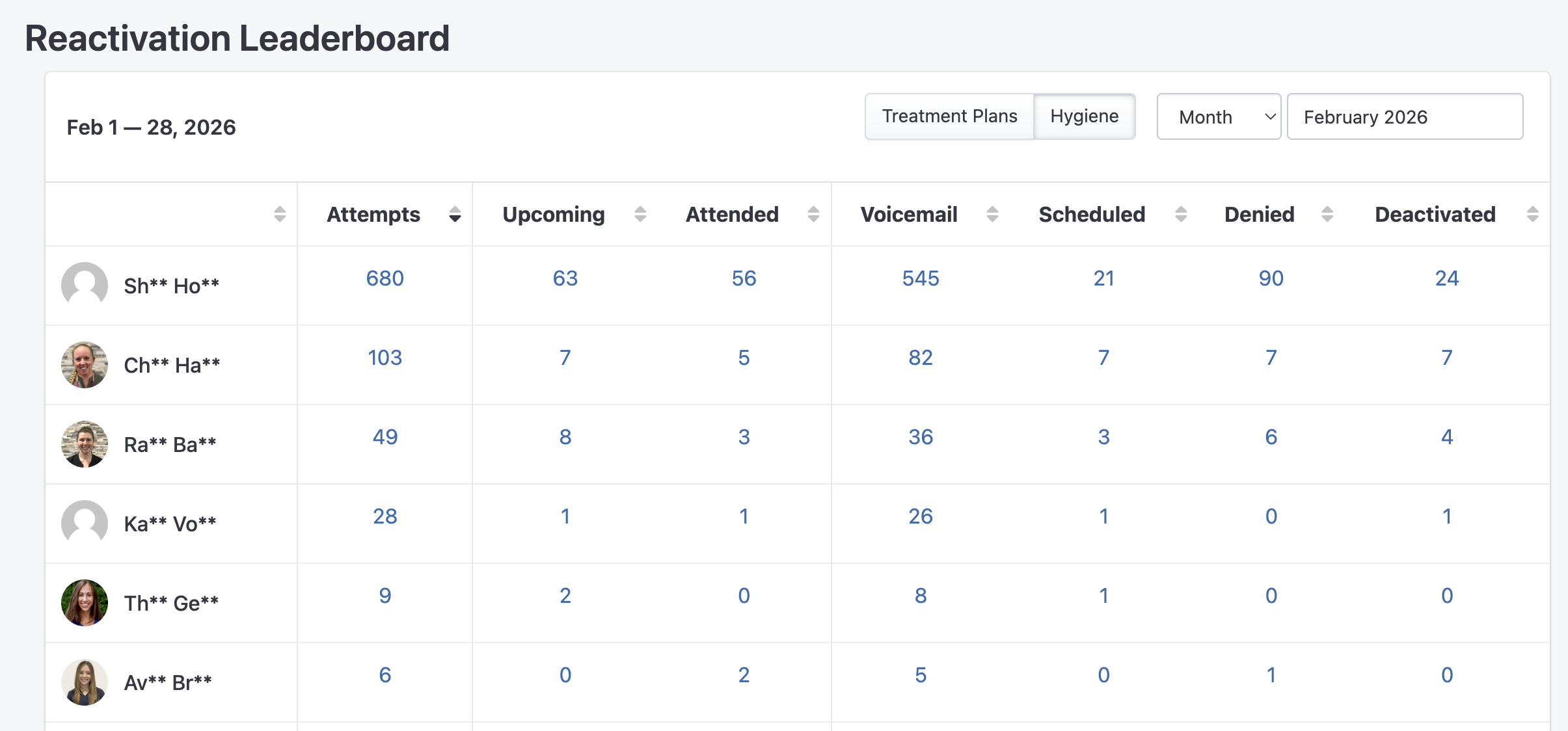
The Reactivation Leaderboard provides a transparent, real-time view of these automated links. Each column tracks a specific stage of the patient journey:
Attempts: The total number of manual calls logged by the agent.
Upcoming: Patients who have a future hygiene or exam appointment scheduled following an outreach attempt.
Attended: Patients who have successfully completed their appointment in the PMS.
Outcome Columns (Voicemail, Scheduled, etc.): These columns reflect the manual tags selected by the agent during the call for internal tracking.
Data Transparency & Drill-Down Reporting
To ensure total accuracy, every number and column on the leaderboard is clickable, allowing you to verify the exact patient data behind the metrics.
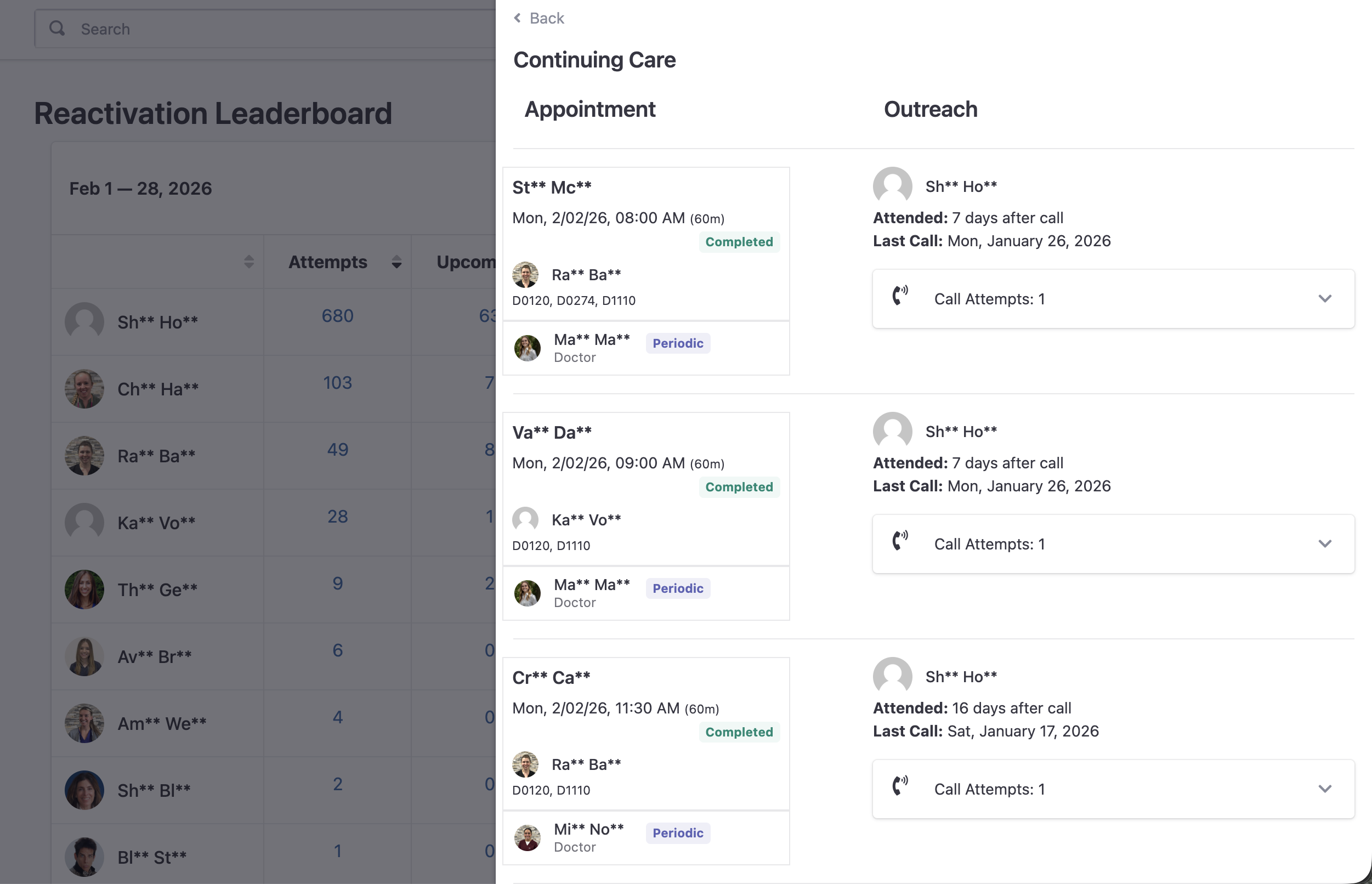
Verified "Attended" Status: Any patient considered "Attended" is strictly backed by a "Completed" appointment in the PMS that is linked to a specific call attempt.
Detailed Outreach View: Clicking a metric opens a detail pane showing precisely how many days after the call the patient attended and which specific outreach attempt prompted the visit.
No Manual Updates Required: If you see a patient in your "Attended" list that you originally tagged as a "Voicemail," the system has already correctly attributed that success to you based on the PMS data.