Preappointment Tracking and Reporting
Last updated: March 4, 2026
What is Preappointment and why does it matter?
For practices that plan to grow, there is no more important practice KPIs than preappointment, the process of ensuring that every patients in the office schedule their next hygiene visit before checking out. In addition to ensuring that patients remain healthy, preappointment helps the practice retain patients over time by reducing the gaps between visit to maintain a consistent relationship with their providers.
From a economic standpoint, preappointment provides the foundation of any effective churn reduction strategy and enables practices realize compounding effects of consistent patient retention on long-term practice growth (see "The 5% Rule" for Patient Retention).
To ensure practices successfully preappoint the dozens of patients visiting that visit a practice each day, TeamCare offers comprehensive preappointment workflows to manage and monitor this process, enabling practices to maximize their patient engagement and operational efficiency.
As you get started, TeamCare's preappointment dashboards provide a comprehensive overview of scheduled future hygiene appointments, detailing which patients have been preappointed for their next hygiene visit, which staff member made each appointment, and next steps to follow up patients who are overdue for a hygiene visit.
Reviewing the Preappointment Dashboard
If you are logged into TeamCare, click here to view your Preappointment Dashboard.
App navigation: Dashboard > Hygiene > Preappointment Dashboard
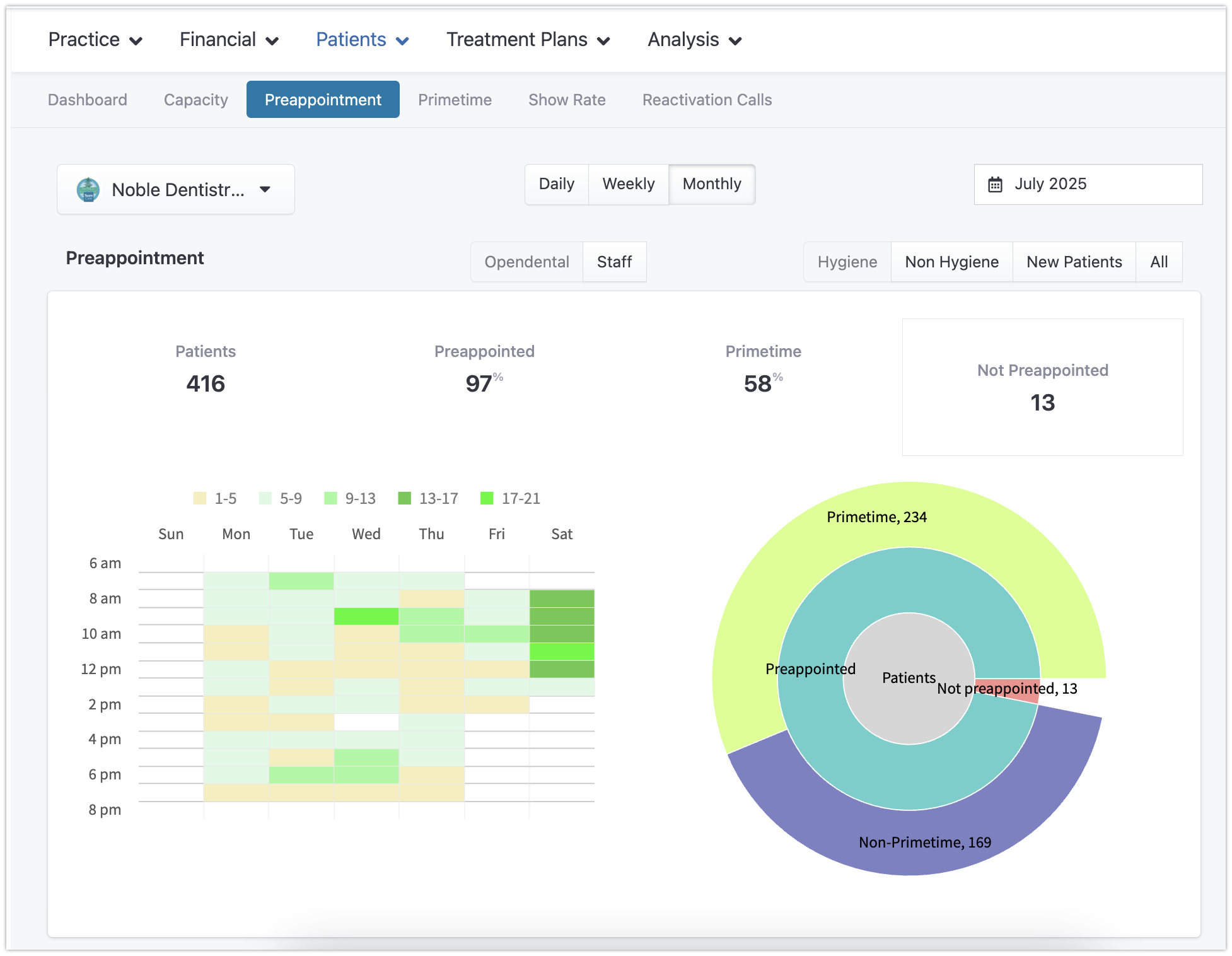
Preappointment Dashboard Customizations
Practice-level KPIs vs. Individual Staff KPIs
The Preappointment Dashboard defaults to practice-level KPIs.
Using the drop-down menu, you can select specific employees and adjust the date range for more detailed insights.
Date Filters
Daily vs. Monthly view
Month selection
Appointment Type Filters
Hygiene - If the patient's originating appointment is hygiene-based (see qualifications below)
Non-Hygiene - If the patient's appointment is exclusively with a doctor
All - This captures any type of appointment, providing a holistic view
Tracking Methods
'PMS View' relies on dynamically extracting data from the future appointments in your practice management system. It’s a hands-off approach where office staff doesn’t have to take any specific action. However, its limitation is in the lack of detailed insights. When patients are not preappointed, this method doesn't provide a clear trail to understand who handled the
'Team View' captures specific scheduler details explicitly recorded per patient during Aftercare and Day Sheets workflows. It offers richer insights, tracking the exact scheduler at checkout. If a patient doesn’t secure a future appointment, this method mandates a reason, ensuring accountability and awareness. For practices aiming to enhance their preappointment performance, the Team method is recommended.
Note: Team View will only populate data if the Front Desk Staff uses the Preappointment workflows during checkout.
Interpreting Preappointment Data
KPIs: View total appointments, their preappointment percentage, primetime percentage, and a direct link to the list of non-preappointed patients.
Heatmap: Visualize the clustering of appointments, showing when most appointments are offered and accepted.
Pie Chart: Understand the proportion between preappointed and non-preappointed patients. It also indicates primetime appointment metrics.