How Are “Lost Patients” Calculated in Lifetime Stats?
Last updated: February 26, 2026
Understanding how your patient base evolves over time is critical to building a healthy, thriving practice. Our Lifetime Stats report helps you do just that — and one key metric in this view is Lost Patients.
What Are Lost Patients?
Lost Patients represent the number of patients your practice did not retain over time. It helps quantify how small drops in patient preappointment rates (the percentage of patients who leave with their next visit scheduled) can have a major compounding effect on your overall patient base.
How It’s Calculated
We compare two numbers:
Max Potential: How many active patients your practice could have, if you retained 100% of patients over time.
Actual: The number of active patients you currently have, based on real retention and preappointment behavior.
The difference between these two numbers is your Lost Patients.
🧠 Formula:
Lost Patients = Max Potential - Actual
This gap shows how many patients your practice is missing due to less-than-perfect retention.
Why It Matters
Even a small change in your preappointment rate has a huge impact over time. Consider these simplified scenarios:
At 100% preappointment, your patient base keeps growing steadily.
At 95%, you lose just 5% per cycle — but that 5% compounds, and over time you’re missing out on a large number of potential active patients.
At 90% or below, the churn accelerates. At 85%, many practices find themselves in “hamster wheel” mode: constantly working hard just to maintain the status quo.
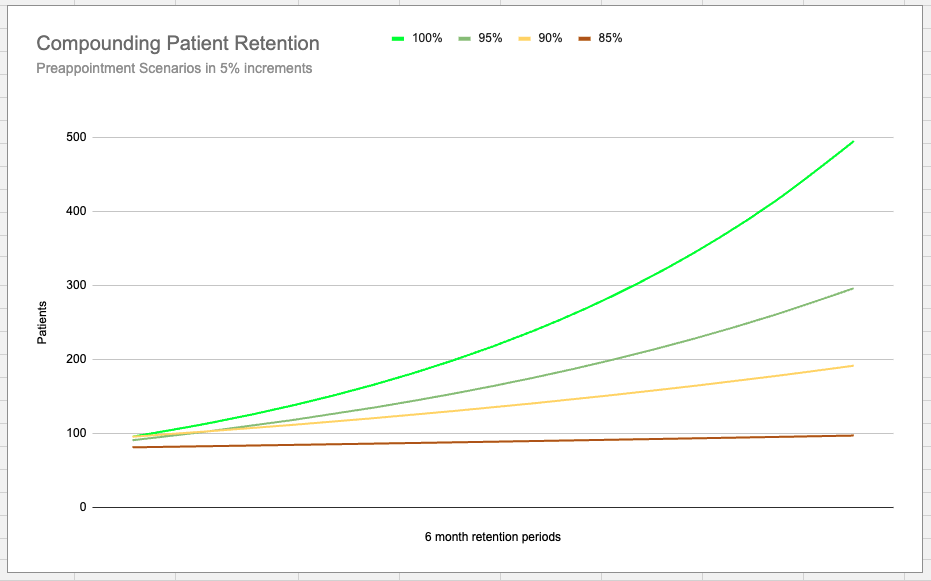
This is why improving your preappointment rate — even by a few percentage points — can significantly increase the long-term health of your patient base.
📌 Quick Example
If your Max Potential (based on 100% preappointment) is 10,000 patients, but your actual active patient base is 8,500, then:
Lost Patients = 10,000 - 8,500 = 1,500
That means your practice has lost 1,500 patients it could have retained over time.
What You Can Do
Focus on improving preappointment scheduling workflows.
Set internal benchmarks and track monthly trends.
Use your Lifetime Stats view to monitor improvements and course-correct quickly.
Need help interpreting your data or improving retention? Reach out to us at support@teamcaredental.com for help!