Eaglesoft: Reconciling with TeamCare
Last updated: February 4, 2026
Why reporting looks different
TeamCare customers will often ask why the information in the Eaglesoft End of Day report does not match what they see in TeamCare. The answer is they are not designed to match because they serve two different purposes. However, they can be easily reconciled once you understand the differences.
TeamCare will show you actual results for the day, regardless of when the data was entered. Eaglesoft’s End of Day report is designed to meet accounting best practices and will “close the day” when End of Day Processing is completed and will include all production, collections, and adjustments from the previous End of Day until the current End of Day Processing was run.
Example: You have $4,000 in production on January 1st and run End of Day at 5 pm. At 7 pm, you enter an additional $500 of Production for January 1st and you entered it as an adjustment. From an Eaglesoft perspective, will only show transactions entered until 5 pm, including any backdated transactions entered on that date, in this case, the initial $4,000. TeamCare will give you the current view of all production, collections, and adjustments for a specific day, regardless of when this was entered, or $4,500 in this example.
Eaglesoft is designed this way to meet accounting best practices. Some of the benefits of this is to catch human errors, help protect your practice against fraud, and prepare for month end closing. In fact, very few dental practice management softwares provide this feature.
To be able to reconcile between TeamCare and Eaglesoft, Eaglesoft reports will need to be filtered by “Other Range of Dates”. Reports will need to be run at the time you are reviewing the TeamCare data.
Below is an additional explanation of the differences in reporting filters in Eaglesoft.
Eaglesoft Daily Reports Filtering Options
Eaglesoft daily reports can be filtered in different ways, but the most common are:
Other Range of Dates: This will filter reports by the calendar date of the transaction. This is designed to find transactions by a specified date range using the date assigned to the transaction and reflects the actual data as it exists at that time. These reports will always match the TeamCare metrics as long as reports are run at the same time.
Other Range of End of Days: This filter is designed to account for items that were included on an End of Day for the range specified. This filter does not consider the transaction date when generating the report and is designed for accounting best practices.
Following is an example of how the filter options can be used in reporting. When logged into Eaglesoft on February 4th and entering a service with a previous date, in our example we will use February 1st, then when running reports for Other Range of Dates, the report will need to be filtered to include 02/01/2019 to display the service.
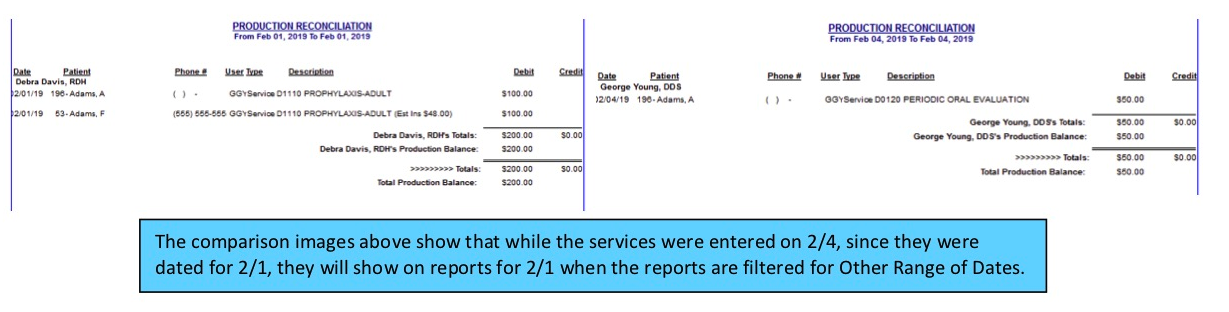
Generating the report by Other Range of End of Days is looking for all transactions that are bundled for the End of Day for February 4th. For our example, it will show services with the calendar date of 02/01/19 since it was actually entered on 2/4.
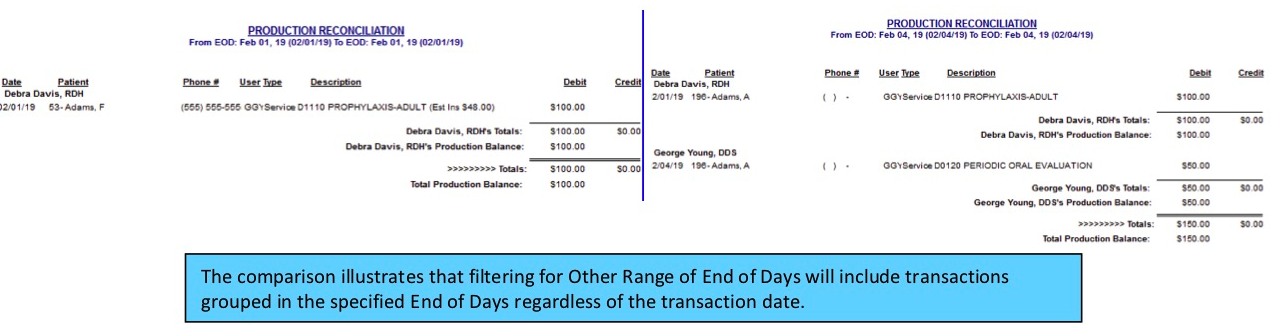
Filtering by Other Range of End of Days can be used for auditing purposes to show that while it was entered with a previous date, the actual services were entered for the End of Day February 4th. This report filter can be used to find and audit production, collection, and adjustments that were back dated when entered.
We realize this might be comlicated. What we want to be clear on though is that we have thorougly tested the data flow between Eaglesoft and TeamCare and are absolytely confident that the data between the systems is accurate.